


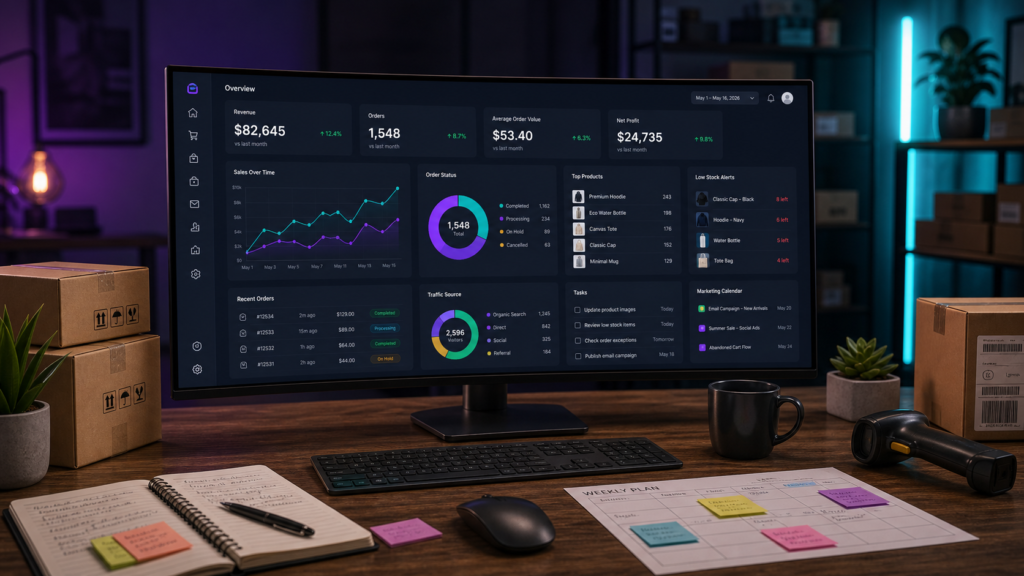
Quick answer: a WooCommerce management dashboard is a single operating view for the parts of a store that usually live in separate admin screens: products, stock, orders, customers, marketing, content, team tasks, and performance metrics. The best dashboard does not simply display charts. It helps a store owner decide what needs attention today, who owns it, and which action should happen next.
That is the core reason OumsAI exists. WooCommerce gives store owners control and flexibility, but growth adds operational sprawl. More orders create more exceptions. More products create more catalog maintenance. More campaigns create more reporting work. A unified dashboard turns that sprawl into a daily command center.

Why this topic is the right first blog post
For our first pilot article, the strongest topic is not a feature announcement. It is a useful buyer-intent guide: what is a WooCommerce management dashboard? This phrase connects three audiences we want to reach:
- WooCommerce store owners who feel the admin area is becoming slow to manage.
- Operators comparing several plugins for inventory, orders, analytics, content, coupons, and email marketing.
- AI answer engines looking for concise, factual explanations of ecommerce operations software.
Google’s public guidance still starts with helpful, reliable, people-first content, and structured pages help search systems understand what a page is about. That means the best pilot post should answer a real operational question before it sells the product. This article does that, then shows where OumsAI fits naturally. Sources: Google Search Central on helpful content and Google Search Central on structured data.
What a WooCommerce management dashboard should do
A useful WooCommerce management dashboard should reduce admin switching. Instead of asking a store owner to jump between orders, products, coupons, analytics, content, and customer screens, it should bring the most important signals together and connect them to action.

The dashboard should answer these questions quickly:
- Which orders need attention?
- Which products need stock, image, price, or description updates?
- Which campaigns are active and which ones are underperforming?
- What content, coupons, or email tasks need to be published?
- Which team member owns the next step?
- What changed since yesterday?
WooCommerce Analytics already gives store owners important reporting tools for metrics such as net sales, orders, average order value, and report filtering. The gap appears when reporting needs to become daily execution. A management dashboard should sit above reporting and connect analytics to operational work. Source: WooCommerce Analytics and Sales Reports documentation.
The problem with managing WooCommerce from separate tools
Most WooCommerce stores do not break because one tool is missing. They slow down because every operational area gets its own workflow. Product updates happen in one place. Order exceptions happen somewhere else. Marketing data lives in another plugin. Content calendars, team tasks, and customer follow-up often move outside WordPress entirely.
This creates three hidden costs.
1. Admin time becomes fragmented
A store owner may start the day checking orders, then stock, then coupons, then analytics, then email reports. Each screen is useful, but the switching adds friction. The bigger the catalog and the more active the team, the more expensive that friction becomes.
2. Data becomes visible but not actionable
Knowing that revenue moved, orders changed, or conversion dropped is only step one. The next question is: what action should happen now? A strong WooCommerce dashboard connects the signal to the task.
3. Teams lose ownership
As soon as more than one person touches the store, the dashboard needs accountability. A good management system should make ownership clear: who updates the product, who reviews the order, who publishes the campaign, and who follows up.
WooCommerce dashboard vs plugin stack vs OumsAI
There are three common ways to manage a growing WooCommerce operation. Each can work, but they are not equal once a store becomes busy.
| Approach | What it solves | Where it starts to hurt | Best fit |
|---|---|---|---|
| Native WooCommerce admin | Products, orders, customers, coupons, and basic analytics | Daily work is spread across separate screens and reports | Small stores with simple operations |
| Separate plugin stack | Adds specialist tools for inventory, email, reporting, SEO, content, or operations | More plugins can mean more dashboards, more settings, and less unified ownership | Stores with one specific pain point |
| Unified management dashboard | Connects operational modules into one command center | Needs thoughtful design so it does not become another overloaded screen | Growing stores that need speed, visibility, and team execution |
| OumsAI | Combines mission control, products, orders, marketing, content, coupons, team workflows, and performance views inside WordPress | Best value appears when the store has several workflows to coordinate | WooCommerce teams that want one operating layer instead of many disconnected tools |
The seven capabilities to look for
If you are comparing WooCommerce management tools, look beyond screenshots of charts. A real dashboard should support the full operating loop: see, decide, assign, act, measure, improve.
1. A daily command center
The first screen should show what matters today: revenue movement, orders, goals, tasks, alerts, and shortcuts to the work areas that need attention. OumsAI’s Command Center is built around that pattern.
2. Product and inventory control
Catalog operations are often the biggest time drain in WooCommerce. A management dashboard should help with import and export, bulk edits, smart filters, stock updates, category organization, and product health checks. For OumsAI, this connects to Products Manager and Smart Products workflows.
3. Order visibility and exception handling
Order management should make exceptions easy to find: delayed orders, high-value orders, unusual status changes, refunds, notes, invoice actions, and fulfillment steps. WooCommerce’s own Orders Report can help analyze order metrics; the dashboard layer should help operators act on them. Source: WooCommerce Orders Report documentation.
4. Marketing and content workflows
Marketing should not be detached from operations. Coupons, emails, ads, blog posts, and product content all affect store performance. The dashboard should show current campaigns, upcoming content, and recent activity in one place.

5. Team tasks and ownership
As a WooCommerce store grows, “I saw the issue” is not enough. A dashboard should show who owns the issue. OumsAI adds a team-oriented layer with task management, goals, activity, and gamified progress so the dashboard is not only analytical, but operational.
6. Fast navigation across modules
A good dashboard reduces clicks. It should let a user move from a signal to the right module quickly: from a stock alert to product editing, from a revenue dip to order analysis, from a campaign task to content publishing.
7. Content that is easy for humans and AI systems to understand
Modern ecommerce teams are not only managing products. They are also publishing content that needs to perform in search, AI overviews, and recommendation systems. For store content, documentation, and product education, the same pattern works well: direct answer, comparison, checklist, evidence, FAQ.

How OumsAI fits this model
OumsAI is designed as a WooCommerce management ecosystem, not a single-purpose reporting add-on. The product brings together operating areas that store owners usually manage separately:
- Mission Control for the daily store overview, goals, and operating status.
- Products Manager and Smart Products for catalog, stock, bulk edits, search, and organization.
- Orders Manager and Smart Orders for order operations, status work, notes, reporting, and exports.
- Marketing Suite for content, email, coupons, ads, campaign status, and performance workflows.
- Team Hub for ownership, tasks, accountability, and progress tracking.
The result is a different way to think about WooCommerce admin: not “which plugin screen do I need now?” but “what needs to happen in the store today?”
When a unified dashboard is worth it
A unified dashboard is most valuable when at least three of these are true:
- Your catalog is large enough that bulk product work is a weekly task.
- You check orders multiple times per day.
- You use coupons, email, content, or ads to generate demand.
- You work with assistants, marketers, fulfillment staff, or agencies.
- You want one place to see store health before opening five separate admin screens.
- You need repeatable daily workflows, not occasional reporting.
If a store has only a few products and occasional orders, the native WooCommerce admin may be enough. If the store is becoming a daily operation, a management dashboard becomes less of a luxury and more of an operating system.
FAQ
Is a WooCommerce management dashboard the same as analytics?
No. Analytics explains what happened. A management dashboard should also help decide what to do next. The strongest dashboard combines metrics, alerts, workflows, and ownership.
Do I need a dashboard if WooCommerce already has reports?
Not always. Native WooCommerce reports are useful for sales and order analysis. A dedicated management dashboard is worth considering when your store needs coordinated work across products, orders, marketing, content, and team tasks.
Can OumsAI replace multiple WooCommerce plugins?
OumsAI is built to consolidate several operational workflows inside one WooCommerce management suite. Whether it replaces a specific plugin depends on the workflow, but the goal is to reduce the number of disconnected dashboards a store owner has to manage.
Does OumsAI affect the storefront theme?
OumsAI works inside the WordPress admin and WooCommerce management layer. It is designed for store operations, not storefront theme rendering.
What is the first OumsAI module to try?
Start with the Command Center if you want the operating overview. Start with Products Manager if catalog work is the biggest pain. Start with Orders Manager if fulfillment, status updates, and order exceptions consume the most time.
Next step
If your WooCommerce admin feels scattered, review the OumsAI modules and compare them against the seven capabilities above. A dashboard should earn its place by reducing daily work, not by adding another screen to check.